

Ask your data
in plain language

Workflows that keep
an eye on your numbers

Try it free for 14 days
The smart assistant that analyses and watches your numbers
Ask questions about your Power BI numbers in plain language: in the chat, in Claude or in Microsoft 365 Copilot, or straight from your Power BI report with the Chat visual.
And let analyses run automatically at set times, with reports and alerts by email or Teams.
Why Power BI Agent?
- Works directly on your existing Power BI models
- Reliable answers, based on your definitions in Power BI
- Mask confidential data before it reaches the AI model
- Built-in skills with definitions for KPIs, ratios and trends
Power BI Agent · Workflow alert · Monday 08:00
Cash position at the end of October below target
| Balance today | € 142,000 |
| Expected end of October | € 17,600 |
| Minimum buffer | € 25,000 |
| Shortfall | € 7,400 |
On 31 October the VAT for Q3 (€ 78,000) and the payroll tax for September (€ 41,000) fall due together, alongside € 67,000 in supplier payments. Of the € 96,000 in receivables falling due, € 61,600 is expected to arrive on time, based on payment behaviour over the past six months. The two largest receivables are with customers who consistently pay late:
- Fietshuis Kortman: € 18,400, 52 days on average
- Tweewielers Veltink: € 11,200, 47 days on average
Recommended action
Agree a payment date with both customers this week. If they pay before 31 October, the balance will come to € 47,200.
Weekly cash position watch · every Monday at 08:00
With a Power BI dashboard, you have to go and look for yourself.
With Power BI Agent, you are informed proactively.
Ask for yourself, or let it tell you
Ask a question whenever you want to know something. Or let your analyses run automatically and receive them at set times.
Chat
Ask in plain language
Ask your question where you already work: in the chat, in Claude, in Microsoft 365 Copilot or directly in your Power BI report with the Chat visual.
You get a well-founded answer with tables and charts, and you can ask follow-up questions right away.
Workflows
Kept informed automatically
Workflows run automatically: daily, weekly or monthly. You receive the outcome by email or as a message in Teams, so the information reaches you without opening a report.
That can be a regular report, or only an alert when something is off, so you can act on it right away.
Why on top of Power BI?
In Power BI, data from different sources comes together. The semantic model adds context: relationships between tables and measures for your KPIs and calculations. That gives AI a solid foundation for reliable answers.
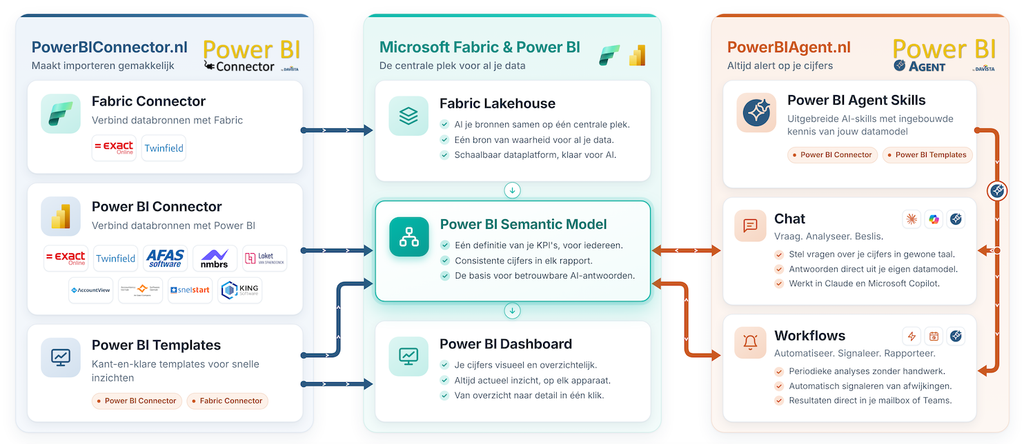
Because Power BI and AI use the same source, the analyses match your Power BI dashboards. And with the Chat visual you ask your questions straight from your report.
AI needs two things: data and context.
Power BI Connector provides the data. Power BI Agent provides the context.
Works with your software
Power BI Agent works with any Power BI report. If you use a Davista Power BI template or a connection through PowerBIConnector.nl, you are ready to go even faster. Power BI Agent already knows your data model.
Exact Online · Twinfield · AFAS · SnelStart · King · AccountView · Multivers · Nmbrs · Loket
Frequently asked questions
Have questions about Power BI Agent? Find the answers below.
What is Power BI Agent?
Power BI Agent is the smart assistant for your Power BI numbers. You ask your questions in plain language via the chat: in the portal, in Claude or in Microsoft 365 Copilot. On top of that, Power BI Agent watches your numbers. Analyses run automatically at set times and you receive the report by email or Microsoft Teams. Or you only get an alert when values fall outside the norm, with an explanation.
The platform offers built-in skills with added context for reliable analysis and configurable masking of sensitive data.
Do I need Power BI knowledge?
No. Power BI Agent is designed so that anyone can query data. You don’t need to know DAX or be familiar with the Power BI interface.
How does the connection to Power BI work?
You connect your Power BI account through a secure connection. Power BI Agent only reads data from your datasets and can then run analyses and answer questions based on the data in your reports and dashboards.
Which Power BI license do I need?
You need at least a Power BI Pro license to connect datasets in a shared workspace.
What do I need to use Power BI Agent?
In addition to a Power BI Agent subscription, you need a Claude subscription (Pro, Max, Team or Enterprise), Microsoft 365 Copilot, or your own Claude API key.
Is my data secure?
Yes. We do not store your Power BI data. Each query is processed in real time and retrieves the data from Power BI through a secure connection.
In the datasets you specify which data must be anonymised, pseudonymised or hidden completely. These tables and fields are masked before they reach the AI model.
Power BI Agent is hosted on the Microsoft Azure platform within Europe, which meets the highest standards for security and compliance. We use advanced encryption and security protocols to protect the data in Power BI Agent.
Is the AI model trained on my data?
With Claude, you can turn this off in the privacy settings of your Claude subscription; that automatically applies to Power BI Agent as well. If you use a Claude API key, this is already off by default. With Microsoft 365 Copilot, your data falls under Microsoft’s data protection for organisations and is not used to train AI models.
Can I try it for free?
Yes, we offer a free trial so you can try out Power BI Agent. The trial account is valid for 14 days and then ends automatically. Of course we hope you stay with us, but you are not tied to anything.
Can I cancel my subscription monthly?
You can cancel your subscription at any time from your account settings. After cancellation, you keep access until the end of your current billing period.
More questions and answers on the support page.
Latest posts
-
Power BI Agent available in Microsoft 365 Copilot

Power BI Agent is now available not only through the Power BI Agent portal and Claude, but also directly from Microsoft 365 Copilot Chat. This lets users analyse their Power BI data from the AI environment they use every day for their work. A Microsoft 365 administrator only needs to configure the connection once in the Microsoft 365 Admin Center. To simplify this, all required settings and configuration values are…
-
Chat visual in your Power BI dashboard
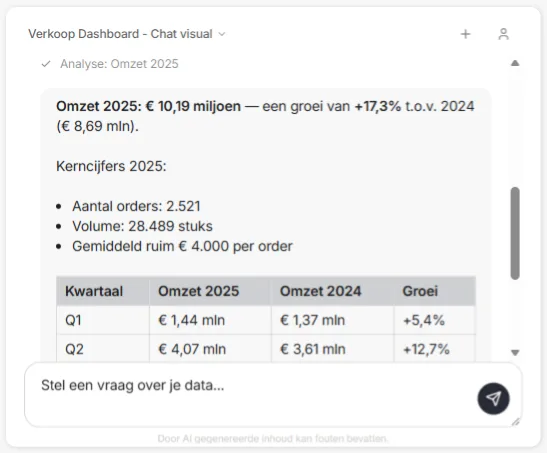
With the introduction of the Power BI Agent Chat Visual, getting insights from your data becomes even easier. You can now chat with Power BI Agent straight from your Power BI report, without switching to the Power BI Agent portal first. The visual is easy to download as a .pbiviz file from the Power BI menu option in the Power BI Agent portal. You then import the visual into Power…